Nucleate by Watchlight
Nucleate turns freeform audio into project history. What you did, what blocked you, and where things are heading.
Free, fully functional, and ad-free donationware. Donate only if you want to.
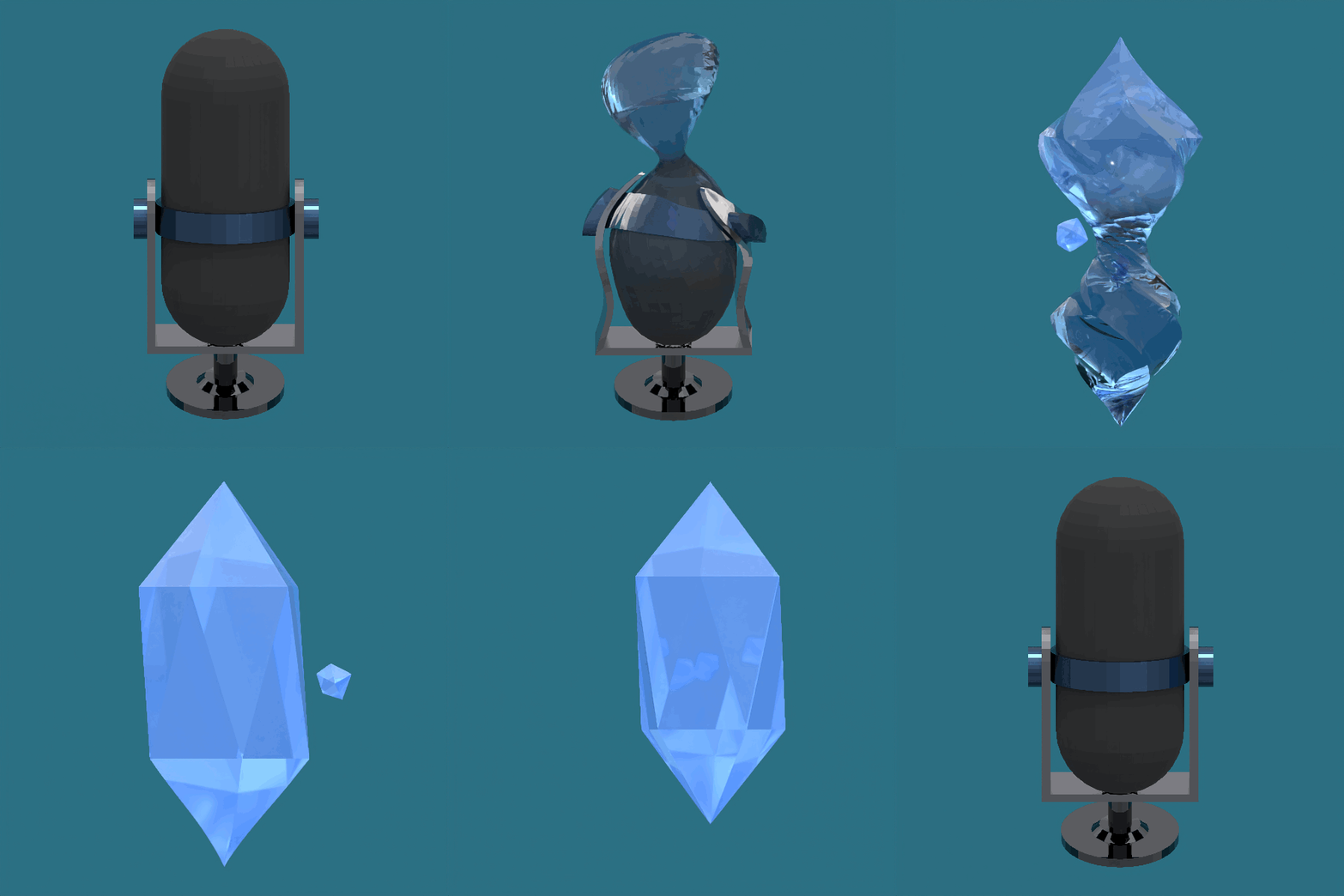
Audio in → project history out. Art by me.
Capturing project history
Capturing project history isn’t easy or natural, at least for me. I like to make things and move fast, and I find it incredibly challenging to carve out space to capture day-by-day problem solving, actions, barriers, and direction. Days or weeks slip by, and I lose track of what actually happened.
Project managers exist for this very reason. In some ways, they are historians that help keep teams aligned to a goal. Folks in these positions are invaluable, yet often inaccessible, to solo builders and small teams.
I can’t hire a project manager, so I tried to build one. More specifically, I built a tool that extracts project history from unstructured, freeform audio notes and monologs.
I’m not the first to realize that people talk fast, and there’s a lot of data in audio.
Most people speak at 150 words per minute. Typing runs closer to ~40, but that assumes you know what to write. There are plenty of apps that can transcribe audio and write short summaries, but none that can extract history out of a month of scattered voice memos.
Nucleate is my attempt at what an ASR, project history tool should look like… Free, powerful, private, and flexible.
It’s not perfect, but it’s a powerful and heavily customizable tool for those who would rather talk through projects instead of writing things down.
Below are real notes from my site, produced from voice audio using Nucleate.
Monthly Devlog: AI-Enhanced Productivity Tools & GameDev Integration
Overview
May was a month of consolidation and strategic refocusing across two projects: Nucleate, with emphasis on Obsidian and Notion integration, packaging, and release readiness; and Godex, a separate Godot documentation assistant. After a shortened beta window earlier in the spring, Nucleate v1 shipped free on Gumroad in May—a deliberate shift from earlier premium pricing experiments. The month also centered on polish, stability, and targeted marketing within GameDev communities.
Highlights & Progress
Nucleate Integration & Refactoring
- Completed a major refactor of the AppState and Control Center components, breaking down massive 2-3k line files into more manageable ~500 line modules using Codex assistance.
- Maintained a separate branch for refactor testing to safeguard the main codebase.
- Shortened the beta window and removed beta feedback prompts to streamline release readiness.
- Reworked contributor thank-you messaging to reduce dependency on external feedback.
- Set modest sales expectations targeting niche users who benefit most from Obsidian and Notion integration.
- Planned short video demos to illustrate workflow integration and attract GameDev users.
AI Model Upgrades & Optimization
- Upgraded cloud models from GPT-3.5 to GPT-4+ and tested alternatives including Mistral 7B and Qwen 3.
- Implemented an auto-optimization system that selects AI models based on system VRAM: systems with >8GB VRAM use Qwen 3, others default to Mistral.
- Updated Ollama model list and trialed Qwen 3 as a slower drop-in replacement.
- Encountered challenges with sparse documentation on model performance and pricing, complicating optimization efforts.
- Identified a critical bug preventing clean aborts during mid-transcription or summarization, impacting stability.
Nucleate Packaging & Deployment
- Finalized Nucleate’s packaging process, smoothing FFmpeg and Ollama installations.
- Achieved successful Windows installation; Mac installation failed on non-admin accounts due to security restrictions.
- Opted to improve Mac install error messaging rather than bypass security, prioritizing user clarity and system integrity.
- Fixed bugs to improve first-time install flow, especially addressing home root vs non-home root user scenarios.
- Released Nucleate version one on Gumroad as a free download; initial traction was minimal despite promotion on Reddit, Discord, and Notion.
- Revised website copy on typing-speed claims after user feedback—the published figures reflect drafting and editing throughput in a voice-to-notes workflow, not raw keyboard typing speed.
Godex AI Assistant Development
- Developed a basic Qt app, Godex, using Ollama’s API to assist with Godot project queries.
- Built a pipeline to crawl Godot documentation, chunk content, and train a local model.
- Godex successfully parses scenes and scripts, identifying functions and mapping node connections/signals, though scene parsing remains incomplete and unpolished.
- Observed hallucinations and unnecessary output from Godex, alongside rapid token consumption (~18% of a 20-day Claude subscription early in testing).
- Initiated a one-week trial to evaluate Godex’s viability before deciding to continue development or pivot focus.
Reflections
- The refactor of large code files into smaller modules significantly improved maintainability and modularity, validating the investment in Codex-assisted restructuring.
- Shortening the beta window and removing feedback prompts streamlined the release process but reduced early user input, which may affect iterative improvements.
- Shipping v1 free on Gumroad clarified positioning after months of premium pricing experiments, even though early traction remained modest.
- Targeting GameDev communities for marketing aligns well with Nucleate’s integration strengths, opening new engagement avenues.
- The critical abort bug revealed a stability weak point that demands urgent attention to ensure user trust.
- Mac installation challenges underscored the importance of respecting OS security models, with clearer error messaging proving a better user experience than workarounds.
- Godex’s early promise is tempered by hallucinations and high token usage, raising questions about cost-efficiency and accuracy.
- Revising typing-speed messaging was necessary to maintain credibility and manage user expectations.
Next Steps
- Prioritize fixing the critical bug that prevents clean abort during mid-transcription and summarization.
- Complete and polish Godex’s scene parsing and node/signal analysis to reduce hallucinations and improve output relevance.
- Monitor the one-week Godex trial closely to decide whether to continue AI assistant development or pivot toward other GameDev tools.
- Develop and release short video demos showcasing Nucleate integration workflows targeted at GameDev communities.
- Explore the feasibility and potential benefits of local codex-like tools inspired by Watchlight’s offline approach for small teams.
Keynotes
Decisions & Observations
- Shortened the beta window and removed feedback prompts to streamline Nucleate release readiness.
- Released Nucleate v1 free on Gumroad in May, shifting from earlier premium pricing plans.
- Initiated a one-week trial of Godex to evaluate viability before deciding to continue development or pivot focus.
Issues & Next Steps
- Will complete and polish Godex’s scene parsing and node/signal analysis to reduce hallucinations and improve output relevance.
- Planned development and release of short video demos showcasing Nucleate integration workflows targeted at GameDev communities.
- Needs to resolve sparse documentation and unclear pricing around AI models to optimize model selection and usage effectively.
- Will explore feasibility and benefits of local codex-like tools inspired by Watchlight’s offline approach for small teams.
Uncategorized Notes
- Prioritized fixing a critical bug that prevents clean aborts during mid-transcription or summarization to improve stability.
- Opted to improve Mac installation error messaging rather than bypass OS security restrictions to maintain system integrity and user clarity.
Monthly Devlog: Stability, Security, and Beta Outreach
Overview
April was focused on strengthening the app’s security and stability, refining core systems, and pushing forward with beta releases despite limited community feedback. A significant portion of effort went into platform-specific challenges around Mac app signing and notarization, alongside foundational improvements to the ship movement system. At the same time, I grappled with outreach difficulties and the challenge of communicating the project’s value authentically while balancing polish and transparency.
Highlights & Progress
Security & Platform Stability
- Migrated API keys from plain-text config files into the Mac keyring to enhance security.
- Closed vulnerable API endpoints to prevent configuration tampering.
- Fixed widget lifecycle issues on Mac mini, resulting in improved app startup stability and UI responsiveness.
- Purchased an Apple developer account and set up signing certificates to enable proper Mac app signing.
- Resolved issues with unsigned files and SSH remote login’s inability to access the keychain.
- Successfully notarized the Mac app after a lengthy 24+ hour process, eliminating Gatekeeper warnings.
- Decided to bundle the Mac app without renaming to avoid release complications.
- Prepared a Windows .exe version that runs but still requires signing; currently investigating signing workflows and certification/licensing costs.
Core Systems & Mechanics
- Reworked the ship movement system in Jumpsuit (working title: Orbital Jump) by splitting space and ground movement into separate systems.
- Improved transition handling between movement modes, though natural switching thresholds remain undefined and transitions still feel awkward.
- Continued to wrestle with Godot scripting complexity, especially amid the version transition from Godot 3 to 4.
- Experimented with IDE-assisted coding tools like Cursor, but integration success remains uncertain.
Beta Feedback & Community Outreach
- Beta feedback stalled with minimal engagement despite outreach efforts.
- Attempts to engage productivity forums, Obsidian, Notion communities, Reddit, and Discord resulted in removed posts or low interest.
- Planned to target Hacker News and Game Dev communities next in hopes of better traction.
- Decided to proceed with beta releases regardless of limited feedback to gather real-world usage data.
AI Tools & Development Workflow
- Used agentic AI and GitHub Copilot to rapidly build a new app in a day-job project, revealing both potential speed gains and quality trade-offs.
- Experimented cautiously with AI-assisted development tools, balancing rapid iteration with maintaining code quality.
Website & Communication
- Revised website text to reduce AI-generated tone while preserving a personal voice.
- Updated the website’s dependency list for transparency and easier maintenance.
- Engaged in an ongoing internal debate about how much to polish the website without losing authenticity.
Reflections
- Moving API keys into the keyring and closing vulnerable endpoints significantly improved security posture and gave me confidence in protecting user data.
- The Mac signing and notarization process was more complex and time-consuming than expected, but overcoming these hurdles was a major milestone for release readiness.
- Splitting the ship movement system clarified the codebase and made mode transitions easier to manage, though the user experience still needs refinement.
- Beta outreach was unexpectedly difficult; many communities were unreceptive or restrictive, which forced me to rethink where and how to engage users.
- AI-assisted coding showed promise in accelerating development but also highlighted the need for careful review to avoid quality degradation.
- Balancing polish and authenticity on the website remains a delicate challenge; I want to be clear and professional without losing the project’s personal touch.
Next Steps
- Define and implement smoother, more natural thresholds for switching between space and ground movement modes.
- Finalize the Windows signing workflow and clarify certification/licensing costs to enable a proper Windows release.
- Launch beta outreach campaigns on Hacker News and Game Dev communities, iterating outreach strategies based on response.
- Continue refining the website content to strike the right balance between polish and authentic voice.
- Explore deeper integration of AI-assisted development tools in Godot, while establishing safeguards to maintain code quality.
Keynotes
Decisions & Observations
- Decided to bundle the Mac app without renaming to avoid release complications.
Issues & Next Steps
- Needs to resolve awkward transitions and undefined natural switching thresholds between space and ground movement modes.
- Needs to finalize Windows signing workflow and clarify certification/licensing costs for Windows release.
- Will explore beta outreach campaigns on Hacker News and Game Dev communities, adjusting strategies based on engagement.
- Will continue refining website content to balance polish with authentic personal voice.
- Will explore deeper integration of AI-assisted development tools in Godot while establishing safeguards to maintain code quality.
Monthly Devlog: Summarization Backend and Space Game Development
Overview
March was a month of significant refinement and restructuring across both the Nucleate app’s summarization backend and the early-stage space game project. My primary focus was on improving the summarization pipeline’s efficiency and reliability while advancing core gameplay mechanics and visuals for the space simulator. Balancing technical complexity, user experience, and cost control shaped many of the decisions and experiments this month.
Highlights & Progress
Summarization Backend & Pipeline
- Transitioned from a rolling summarization approach to a progressive compression method, processing transcript chunks individually before combining them for better quality and cost efficiency.
- Increased OpenAI chunk size from 1500 to 6000 tokens, with chunk and context sizes made configurable based on hardware profiles to optimize performance.
- Restructured the summarization pipeline into clear, distinct phases: pre-pass cleanup, chunking, summarizing, fact extraction, compression, synthesis, and stylization.
- Fixed a critical bug where prompts were not passed to the AI model, which previously caused nonsensical summaries.
- Added a beta checkpoint feature to track user summaries, though a state manager bug still causes inaccurate activity reflection during rapid summary runs.
- Experimented with OpenAI Codex on a large Python file, uncovering about 160 useful code improvements, highlighting potential for automated code refinement.
- Began plans to consolidate two separate summarizer backends into a single unified system to simplify maintenance and resolve prompt metadata issues.
User Interface & Experience Enhancements
- Refined the sales page visuals by replacing pixel art with photorealistic water and crystal elements, improving aesthetic appeal; microphone materials still require polishing.
- Added SVG graphics and an animated cube banner to enhance the sales page’s dynamism.
- Simplified bug reporting by integrating GitHub Reporter and a Google form, and moved the contributing section higher for better visibility.
- Refactored the startup sequence into four interactive cards representing processing stages, with plans to add SVG arrows for visual flow.
- Updated the main hub screen with on-hover text for buttons and toggles to improve usability.
- Enabled drag-and-drop support for audio files, with consideration for extending drag-and-drop to task running from the hub.
- Converted the directories panel into an interactive first-start walk-through to improve onboarding.
- Polished app language, fonts, and UI styles for cross-platform consistency, though seamless visual integration between startup and hub remains a challenge.
- Fixed a transcription bug related to the audio output folder, ensuring transcripts always generate correctly.
- Packaged the app as a Mac DMG using Metal, enabling beta license distribution to family and testers.
Space Game Development (Jumpsuit)
Orbital Jump and Freefall were earlier working titles for this project.
- Learned Godot engine basics and rebuilt a simple project to understand scripting and game development workflows.
- Fixed spacecraft gravity calculations to be based on planet surfaces rather than object centers, improving realism.
- Lowered damping for driftier ship movement; planning to add rebound effects on collisions for better landing feel.
- Explored macro-scale physics for asteroid collisions and fracturing, including material properties and geode exposure.
- Developed a grapple hook mechanic for dynamic player interaction with asteroids.
- Built a six-degree-of-freedom ship controller and a player controller capable of switching between ship and player control; ground movement and state transitions remain unresolved.
- Debated inclusion of unnavigatable environments like wormholes and black holes for gameplay impact.
- Decided to focus on smaller, self-contained mini-games for testing core mechanics and iteration speed.
Cost & Technical Challenges
- OpenAI usage costs exceeded initial expectations; progressive compression helps limit data processed but requires ongoing balancing.
- Monthly summary generation still suffers from sentence structure issues, repetition, and broken content.
- Considering allowing users to customize chunk size and context length, weighing flexibility against risks of AI prompt conflicts.
Reflections
- The switch to progressive compression summarization has noticeably improved summary quality and cost control, validating the decision to restructure the pipeline.
- Fixing the prompt-passing bug was a critical breakthrough, as it directly impacted summary coherence.
- Integrating GitHub Reporter alongside a Google form streamlined bug reporting and increased user engagement.
- Visual upgrades on the sales page significantly enhanced professionalism, though some UI transitions still feel disjointed.
- Learning Godot and prototyping the space game mechanics was rewarding but highlighted how much remains to be done, especially in player-ground interaction and physics polish.
- The state manager bug in activity tracking remains a frustrating blocker that undermines confidence in rapid summary runs.
- OpenAI cost management is an ongoing tension point, requiring careful experimentation with chunk sizes and compression strategies.
- The idea of consolidating summarizer backends into one system is appealing but will require careful planning to avoid regressions.
Next Steps
- Investigate and fix the state manager bug causing inaccurate activity reflection during rapid summary runs.
- Continue consolidating the two summarizer backends into a single, maintainable system.
- Improve seamless visual integration between the startup sequence and main hub screen.
- Advance the space game’s ground movement mechanics and state transitions, and refine collision rebound effects.
- Experiment with user-configurable chunk size and context length options, carefully monitoring AI prompt stability and cost impact.
Keynotes
Decisions & Observations
- Decided to switch summarization pipeline to progressive compression for better quality and cost efficiency.
- Improved sales page visuals with photorealistic elements and SVG animations; still need to polish microphone materials and UI transitions.
- Advanced space game development by fixing gravity calculations, implementing grapple hook, and building six-degree-of-freedom ship controller; ground movement and state transitions remain unresolved.
- Ongoing challenge managing OpenAI usage costs; progressive compression helps but requires continued balancing.
Issues & Next Steps
- Needs to resolve state manager bug causing inaccurate activity tracking during rapid summary runs.
- Will explore user-configurable chunk size and context length settings, balancing flexibility against AI prompt stability and cost.
- Enhanced onboarding with interactive first-start walkthrough and drag-and-drop audio support; considering extending drag-and-drop to task running.
- Will focus on smaller, self-contained mini-games for rapid testing of core mechanics.
- Needs to improve seamless visual integration between startup sequence and main hub screen.
- Will refine space game collision rebound effects and ground movement mechanics.
Uncategorized Notes
- Fixed critical prompt-passing bug that caused nonsensical summaries, improving summary coherence.
- Began consolidating two summarizer backends into a single unified system to simplify maintenance and resolve prompt metadata issues.
- Fixed transcription bug ensuring consistent transcript generation.
- Packaged app as Mac DMG with Metal support for beta distribution.
Monthly Devlog: Cross-Platform Transcription App Development and Packaging
Overview
February was a pivotal month focused on solidifying cross-platform packaging, refining transcription backend performance, and advancing user-facing features in preparation for an upcoming beta launch. The primary themes revolved around overcoming platform-specific challenges—especially on macOS and Windows—while stabilizing core transcription engines and implementing robust license and beta management systems. This month also involved critical decisions on feature prioritization and technical debt reduction to improve app stability and user experience.
Highlights & Progress
Packaging & Cross-Platform Compatibility
- Successfully configured PyInstaller for Windows CPU-only builds, including CUDA backend support and a progress indicator in the installer.
- Packaged the macOS app as a
.dmg, though notarization and full packaging remain incomplete for Apple Silicon Macs and Windows non-CUDA versions. - Purchased a Mac Mini to facilitate testing of Mac-specific bugs, packaging issues, and OS quirks.
- Persistent GUI flicker on macOS caused by full app reboot remains a blocking issue for Mac release.
- Metal Performance Shaders on Mac Mini exhibited slow transcription performance; WAV timestamp bugs caused repeated resummarization.
- Encountered runtime import compatibility issues between PyTorch and pyannote on Intel Macs.
- Subprocess launches tied to FFmpeg failed on Mac, with possible related issues on Windows.
- Current app incompatibility with non-CUDA GPU setups on Windows remains unresolved.
Transcription Engine & Backend Improvements
- Refactored Whisper downloads and transcription backends to run as subprocesses, improving modularity and process control.
- Made Faster Whisper the default transcription engine due to its efficient Apple Silicon support and lack of Torch dependency.
- Resolved Faster Whisper timeout issues by switching from direct print logging to debug-level logging.
- Maintained Torch 2.8 as the stable Whisper version due to codec conflicts with Torch 2.10 and FFmpeg/ffprobe.
- Ongoing testing of Torch 2.10 optimized for Apple Silicon with virtual environment setup underway.
- Fixed transcription bugs caused by overlapping watch and output folders.
- Identified and began fixing bugs in Whisper’s MPS and CPU backends after recent refactors.
- Abort functions implemented to allow mid-run termination of downloads and subprocesses using OS-specific kill commands; older backends lack abort support to avoid instability.
- Failed or incomplete subprocesses currently return empty strings; plans to switch to boolean returns and explicit abort signals.
User Features & Beta Preparation
- Added optional speaker identification toggle; dropped persistent speaker awareness feature due to complexity.
- Created running config files for speaker ID and experimented with debounce timers to handle rapid state changes.
- Set up screening and feedback forms and a dedicated beta page within the app.
- Added personalization options on the beta panel UI, including name, description, and accent color, with plans for badges and multiple avatar file types.
- Collected annotated screenshots for documentation; reorganized website structure; began work on animations and summarization demos.
- Beta testing scheduled to start mid-March, with initial UX feedback from a pre-beta tester.
- License expiration dates moved from plain text to secure storage.
- Began implementing webhooks for license and cryptography management, planning to use Netlify as backend.
- Decided to distribute unique, hashed licenses during sales to prevent modification and piracy.
- Considering a defense mechanism to restrict custom mode tab access based on license validity.
- Ongoing decisions on feature tiering between free and pro versions, especially for diarization and smart insights.
Architecture & Workflow Enhancements
- Added a process manager in AppState to handle subprocess termination and disable automated processing.
- Reorganized the hub events system to improve serialized communication, event ordering, and content ID consistency.
- Large app size remains a concern, particularly for CPU-only setups; plans to optimize and split large configuration files for version 2.0.
- Considering adding a simplified mode builder page with alert systems to warn users about performance impacts.
Reflections
- The subprocess refactor and process manager additions significantly improved control over transcription workflows and error handling.
- Faster Whisper’s performance on Apple Silicon was a pleasant surprise, validating the decision to make it the default engine.
- macOS packaging and GUI stability issues proved more stubborn than anticipated, highlighting the complexity of cross-OS compatibility and the need for dedicated hardware testing.
- The decision to maintain Torch 2.8 as stable was pragmatic given codec conflicts, though ongoing Torch 2.10 testing may unlock future optimizations.
- Dropping persistent speaker awareness simplified the feature set and reduced technical overhead, though it leaves room for future enhancement.
- License management improvements and the move toward hashed licenses represent a critical step toward secure distribution, but questions remain on handling license downgrades and user access.
- The large app size and configuration complexity underscore the importance of modularization and user-friendly tooling to maintain performance and scalability.
- Beta preparation efforts, including UI personalization and feedback integration, set a solid foundation for meaningful user testing and iteration.
Next Steps
- Resolve macOS GUI flicker and packaging issues to unblock the Mac release.
- Continue testing Torch 2.10 on Apple Silicon and evaluate potential upgrades.
- Implement explicit abort signals and boolean returns for subprocesses to improve error handling.
- Finalize license management backend with Netlify webhooks and develop defense mechanisms for license-based feature access.
- Optimize app size and configuration management ahead of version 2.0; prototype simplified mode builder and alert systems.
Keynotes
Decisions & Observations
- Decided to make Faster Whisper the default transcription engine for better Apple Silicon support and no Torch dependency.
- Implemented subprocess abort functions with OS-specific kill commands; next step is to switch subprocess returns from empty strings to boolean values and explicit abort signals for better error handling.
- Decided to distribute unique, hashed licenses during sales to prevent modification and piracy; will finalize license management backend using Netlify webhooks and develop defense mechanisms restricting feature access based on license validity.
- Dropped persistent speaker awareness feature due to complexity; added optional speaker identification toggle with debounce timers instead.
Issues & Next Steps
- Needs to resolve persistent macOS GUI flicker caused by full app reboot to enable Mac release.
- Needs to fix macOS packaging and notarization issues, especially for Apple Silicon Macs and Windows non-CUDA versions.
- Will continue testing Torch 2.10 on Apple Silicon with virtual environments to evaluate potential upgrades despite current codec conflicts.
- Will optimize large app size and configuration complexity ahead of version 2.0, including splitting large config files and prototyping a simplified mode builder with alert systems.
Uncategorized Notes
- Scheduled beta testing to start mid-March with UI personalization and feedback integration in place.
Monthly Devlog: Transcription & Diarization System Enhancements
Overview
This month, my primary focus was on refining the transcription and diarization pipeline to improve accuracy, performance, and user experience across platforms—especially addressing Mac-specific challenges. Key themes included centralizing styling for maintainability, optimizing subprocess management for transcription workflows, and enhancing offline capabilities by bundling models. Balancing app size, stability, and UI clarity were recurring considerations throughout.
Highlights & Progress
Codebase & Styling Consolidation
- Centralized all app styling into a single theme class, unifying color schemes, fonts, and styles for easier maintenance.
- Merged two similar manual transcription classes to simplify the codebase and reduce redundancy.
- Partitioned pro-user toggles and moved diarization speaker identification rules into the AI engine panel to streamline the UI and improve user clarity.
Transcription and Diarization Pipeline
- Resolved dependency conflicts by uninstalling the monolithic Hugging Face package and installing individual modules, stabilizing the transcription pipeline.
- Integrated OpenAI Whisper, Faster Whisper, and diarization as subprocesses that trigger automatically upon file detection, improving workflow automation.
- Upgraded the GPU torch package to CUDA 12.9, enabling GPU-accelerated transcription and diarization, significantly boosting performance on supported hardware.
- Shifted speaker assignment to occur after summarization based on LLM confidence scores—running diarization labels once the summary pass has enough context to judge speaker identity reliably.
- Refactored transcript chunking to break on logical boundaries such as sentences or paragraphs rather than arbitrary cuts, improving readability and coherence.
Platform-Specific Improvements (Mac Focus)
- Replaced OpenAI Whisper with Faster Whisper on Mac to address compatibility and performance issues related to weaker Intel hardware and lack of Metal support.
- Bundled the diarization model within the app for offline use, increasing app size by approximately 300MB but enabling functionality without internet connectivity.
- Developed a script to check and start Ollama on Mac to assist with hardware acceleration workflows.
- Despite ongoing Mac stability challenges, decided to keep hardware-accelerated transcription accessible to all users.
- Prepared a small beta testing group (~5 testers) for both Mac and Windows platforms to gather targeted feedback.
UI & Animation Enhancements
- Modified the animation engine to accept live app state inputs, reducing lag and improving responsiveness.
- Refreshed confirmation screens with looping blue circle animations and button depress effects to enhance user feedback.
- Added fallback URLs for hyperlinks and improved mode builder persistence to increase robustness.
- Addressed medium-priority bugs related to responsiveness, save button feedback, real-time confirmation feedback, button interactions, and smoothing subprocess calls.
Reflections
- Centralizing styling and merging transcription classes significantly improved maintainability and reduced complexity, validating the decision to consolidate early.
- Automating subprocess triggers for transcription and diarization streamlined workflows but surfaced new challenges in managing subprocess stability and feedback responsiveness.
- Bundling the diarization model offline was a tradeoff: it improved offline usability but increased app size notably, raising questions about compression and packaging strategies.
- Mac hardware limitations, especially on Intel models lacking Metal support, remain a persistent hurdle, requiring creative workarounds like switching to Faster Whisper and scripting Ollama management.
- The shift to assigning speakers post-summarization based on LLM confidence is promising but requires further validation to confirm diarization accuracy with multiple speakers.
- UI animation improvements enhanced user experience, but smoothing subprocess interactions and resolving related bugs will be critical to polish the final product.
- Preparing a small beta group is a prudent step to collect focused, actionable feedback before wider release.
Next Steps
- Investigate and implement a more effective model unloading mechanism to prevent VRAM bloat and app crashes during transcription and diarization.
- Explore compression or alternative packaging methods to reduce the app size impact from bundling the diarization model.
- Continue improving Mac hardware acceleration support, including refining Ollama management scripts and evaluating Metal-capable Mac models.
- Conduct thorough testing of diarized insights with multiple speakers to validate the new speaker assignment approach and diarization accuracy.
- Finalize UI feedback animations and smooth subprocess interactions while addressing outstanding medium-priority bugs to enhance overall stability and polish.
Keynotes
Decisions & Observations
- Decided to centralize all app styling into a single theme class and merge similar transcription classes to improve maintainability and reduce code complexity.
- Resolved dependency conflicts by replacing the monolithic Hugging Face package with individual modules to stabilize the transcription pipeline.
- Will investigate and implement improved model unloading mechanisms to prevent VRAM bloat and app crashes during transcription and diarization.
Issues & Next Steps
- Needs to resolve subprocess stability and feedback responsiveness issues caused by automated subprocess triggers.
- Needs to validate diarization accuracy and speaker assignment effectiveness with multiple speakers through thorough testing.
- Needs to address medium-priority UI bugs related to responsiveness, button feedback, and subprocess call smoothing to polish the product.
- Will explore compression or alternative packaging strategies to reduce app size impact from bundling the diarization model.
- Will continue refining Mac hardware acceleration support, including Ollama management scripts and evaluating Metal-capable Mac models.
- Will finalize UI feedback animations and smooth subprocess interactions to enhance stability and user experience.
Uncategorized Notes
- Integrated OpenAI Whisper, Faster Whisper, and diarization as automated subprocesses triggered on file detection to streamline workflows.
- Upgraded GPU torch package to CUDA 12.9 to enable GPU-accelerated transcription and diarization, boosting performance on supported hardware.
- Shifted speaker assignment to occur after summarization based on LLM confidence scores—applying labels once the LLM has enough context to judge speaker identity reliably.
- Replaced OpenAI Whisper with Faster Whisper on Mac to address compatibility and performance issues on Intel hardware lacking Metal support.
- Bundled the diarization model offline within the app to enable functionality without internet connectivity, accepting a 300MB app size increase.
- Developed a script to manage Ollama hardware acceleration workflows on Mac, while keeping hardware-accelerated transcription accessible despite stability challenges.
- Prepared a small beta testing group (~5 testers) on Mac and Windows to gather targeted feedback before wider release.
Monthly Devlog: Core Architecture Refactor and UI Stabilization
Overview
This month’s primary focus was a comprehensive refactor of the app’s core architecture, transitioning from the legacy Tkinter layout to PySide 6. Alongside this, I concentrated heavily on stabilizing and polishing core user mode features, improving backend state management, and experimenting with UI animations and feedback elements. While foundational work on a new app front page (“hub”) began, final design decisions remain pending as I prioritize robustness and responsiveness.
Highlights & Progress
Architecture & Backend State Management
- Successfully refactored backend scripts to enable dynamic panel updates in response to AppState changes rather than static boot-time refreshes, resulting in 12 out of 13 panels consistently displaying fresh data.
- Consolidated state management calls into a centralized AppState module, streamlining update logic and reducing redundant refreshes.
- Throttled config file refresh frequency and wrapped update calls with conditionals to avoid unnecessary UI updates, improving overall efficiency.
- Developed a new event bus and synchronization system to coordinate backend updates, enhancing communication between components.
Core User Mode Features
- Completed key user mode functionalities including selection, preference management, and custom mode creation, with passing tests for saving, deleting, and modifying modes.
- Added a dedicated GUI space for managing custom user modes, featuring double-click tag editing for intuitive interaction.
- Implemented a time delay on the main hub activation button to prevent race conditions during startup.
UI & Animation Experiments
- Reinstated animations that were dropped during the refactor and introduced per-page rescaling controls.
- Experimented with blending idle, active, and busy animations, though runtime errors and jumpy behavior remain challenges.
- Tested layering a repeating short loop animation over existing animations but encountered stability issues.
- Explored split flap-style interfaces for user mode switching and startup catchphrase animation; startup animation was acceptable, but mode-switching interface needs rework.
- Evaluated various deep gray monospace fonts for the loading screen, with no final decision yet.
- Began adding user feedback elements such as a terminal-style window on the hub to display backend events (model loading/unloading, transcription), and a progress bar for Faster Whisper model downloads updating in 5% increments.
- Considered additional feedback widgets including status indicators, loading wheels, and live resource usage monitors.
New App Front Page (“Hub”)
- Initiated design work on a new hub page featuring visual status indicators, error handling, animated GIFs, and setup cards.
- Layout and final UI design remain undecided, with fine-tuning needed on timing, colors, and error handling.
- Added a terminal window with welcome messages and basic instructions to orient users.
Stability & Compatibility
- Fixed node-related bugs that caused unexpected config file refreshes and wiping by setting a new global option.
- Identified ongoing Mac compatibility issues and Qt threading behavior causing app hangs during large updates.
- Planned migration of heavy tasks (transcription, model downloads, tests) to proper background threads to improve responsiveness.
- Began auditing current threading usage to prevent hangs and improve stability.
Polish & Miscellaneous
- Started work on tray menu management targeting beta or pre-beta builds.
- Evaluated additional animations (idle/init sequences, splash card cycling user modes) cautiously to avoid performance degradation.
Reflections
- The architectural refactor to PySide 6 fundamentally improved dynamic UI updates and modularity, validating the decision despite initial complexity.
- Consolidating state management into AppState significantly reduced redundant refreshes and improved maintainability.
- Animation blending experiments revealed the complexity of smooth transitions and layering; stability issues highlight the need for incremental testing and fallback strategies.
- The split flap-style UI for mode switching was an intriguing idea but did not meet usability expectations, prompting reconsideration.
- Introducing a terminal-style backend event window added transparency and user feedback, which was well-aligned with the goal of making internal processes visible.
- Threading challenges with Qt exposed limitations in the current approach; moving heavy tasks off the main thread is critical to prevent freezes.
- Mac compatibility remains a stubborn issue, underscoring the need for dedicated platform testing and possibly platform-specific fixes.
- Prioritizing stabilization and polish over new feature expansion helped maintain focus and prevent feature creep during this complex transition.
Next Steps
- Finalize the design and layout for the new app front page (“hub”), incorporating user feedback elements and error handling.
- Complete migration of heavy tasks to background threads and audit threading usage to eliminate app hangs.
- Resolve outstanding Mac compatibility issues through targeted debugging and testing.
- Revisit and refine the user mode switching interface, exploring alternatives to the split flap design.
- Evaluate prioritization and feasibility of supporting non-OpenAI APIs and alternative operation modes after core stability is secured.
Keynotes
Decisions & Observations
- Decided to refactor core architecture to PySide 6, improving dynamic UI updates and modularity.
- Initiated new app front page (“hub”) design with visual status indicators and feedback elements; final layout and design decisions pending.
Issues & Next Steps
- Encountering runtime errors and instability in animation blending and layering; stability issues require incremental testing and fallback plans.
- Split flap-style UI for mode switching failed usability expectations; needs reconsideration and redesign.
- Ongoing Mac compatibility problems require dedicated debugging, platform testing, and possibly platform-specific fixes.
- Needs to finalize hub design incorporating user feedback and error handling.
- Will complete migration of heavy tasks (transcription, downloads, tests) to background threads to improve responsiveness.
- Will revisit and refine user mode switching UI, exploring alternatives to split flap design.
- Will evaluate support for non-OpenAI APIs and alternative operation modes after securing core stability.
Uncategorized Notes
- Consolidated state management into a centralized AppState module to reduce redundant refreshes and improve maintainability.
- Developed a new event bus and synchronization system to enhance backend component communication.
- Completed key user mode features with GUI support for managing custom modes and safeguards against startup race conditions.
- Introduced terminal-style backend event window for user feedback, improving transparency of internal processes.
- Identified Qt threading issues causing app hangs during large updates; critical to migrate heavy tasks to background threads and audit threading usage.
- Must resolve Mac compatibility issues through targeted debugging and testing.
Monthly Devlog: UI Migration and Animation Optimization
Overview
November was focused on two major themes: migrating the UI framework from Tkinter to PySide6 to enhance user experience and robustness, and refining Blender-based animations for the splash page and app visuals. Alongside these, I worked on integrating AI engine controls, improving dark mode support, and addressing key performance and usability challenges. The month involved balancing ambitious feature goals with practical performance constraints and laying groundwork for future UI polish and workflow improvements.
Highlights & Progress
Animation & Visuals
- Completed 7 out of 10 planned animations using Blender geometry nodes, targeting simple top-down 2D crystal-style visuals at 12 fps with ~240 KB per frame.
- Explored Blender’s NLA track editor for multi-layer rendering and compositing on the splash page animation; however, this caused slow load times and GUI hangs.
- Decided to prioritize simpler animations for smoother performance and began investigating direct GIF export from Blender to speed up workflow despite some quality trade-offs.
UI Framework Migration & Features
- Migrated core UI framework from Tkinter to PySide6, gaining access to advanced features like tooltips, hover actions, buttons, signals, and threading.
- Created reusable control panels with API-checking widgets for Notion, OpenAI, and Obsidian integrations.
- Implemented Obsidian vault directory detection by checking for the presence of a
.obsidianfolder. - Developed a new scroll text class that overlays fake scroll bars on hidden native scroll bars to fix scroll behavior issues in dark mode.
- Added status indicators for download completion and connection success, though error handling remains an area needing improvement.
- Refactored the AI engine settings panel, introducing a llama model selection interface with recommended and custom options.
- Separated business logic from UI code across multiple panels to improve maintainability.
Dark Mode & UX Enhancements
- Implemented dark mode styling in most GUIs of the Nucleate app, inspired by GitKraken’s high-contrast style.
- Began learning Qt’s buttons, signals, and threading to reduce errors and accelerate development.
- Debated UI improvements such as looping GIF animations in the navigation tree and splitting side panels into persistent vs. frequently refreshed content for better UX flow.
Project Management & Strategy
- Considered releasing a beta Tkinter version if PySide6 complexity proves too high.
- Evolving pricing strategy toward a lower entry point with beta discounts to encourage early adoption.
- Postponed features like cached files deletion and user-defined folders until after core dark mode work is stabilized.
Reflections
- The PySide6 migration, while challenging due to a steep learning curve, has significantly improved UI robustness and opened up richer interaction possibilities.
- Blender’s multi-layer animation approach, though visually compelling, introduced unacceptable performance bottlenecks, prompting a necessary shift toward simpler animations and alternative export methods.
- Separating business logic from UI code was a productive step toward cleaner architecture and easier future enhancements.
- Dark mode implementation was smoother than expected, especially with inspiration from existing high-contrast designs, but scroll behavior required a creative workaround with fake scroll bars.
- Error handling in integrations like Ollama remains fragile and unclear, highlighting the need for more robust feedback mechanisms.
- The ongoing debate about UI panel organization and memory persistence reflects a broader tension between performance optimization and hardware compatibility that will need careful balancing.
Next Steps
- Optimize Blender animation pipeline with a focus on direct GIF export and simpler animation layers to reduce load times and UI slowdowns.
- Continue refining PySide6 UI components, especially dialog systems for integration panels, to improve modularity and user experience.
- Enhance error handling clarity and robustness across AI engine integrations and network-dependent features.
- Explore UI side panel redesign to separate persistent content from frequently refreshed elements, improving workflow efficiency.
- Finalize dark mode customization options and prepare for a second round of UI polish based on user feedback and internal testing.
Keynotes
Decisions & Observations
- Decided to prioritize simpler Blender animations and direct GIF export to improve performance and reduce UI slowdowns.
- Created reusable control panels with API-checking widgets and implemented Obsidian vault detection.
Issues & Next Steps
- Needs to resolve fragile and unclear error handling in AI engine integrations and network features.
- Will explore redesigning UI side panels to separate persistent content from frequently refreshed elements for better workflow.
- Will continue refining PySide6 UI components, focusing on dialog systems for integration panels.
- Will finalize dark mode customization and prepare for further UI polish based on feedback and testing.
- Considering releasing a beta Tkinter version if PySide6 complexity proves too high.
Uncategorized Notes
- Migrated UI framework from Tkinter to PySide6 to leverage advanced features and improve robustness.
- Developed a custom scroll text class with fake scroll bars to fix dark mode scroll behavior issues.
- Separated business logic from UI code to enhance maintainability.
Monthly Devlog: Nucleate Development & System Refinement
Overview
October was a month of significant refinement and foundational restructuring for Nucleate, focusing on improving core systems, streamlining dependencies, and laying groundwork for future features. While active feature development slowed due to shifting priorities, critical bug fixes, architectural simplifications, and backend enhancements moved forward, setting the stage for upcoming beta releases and expanded functionality.
Highlights & Progress
System Architecture & Dependencies
- Removed Torch and MPS dependencies, reducing the executable size to approximately 300 MB, improving distribution and performance.
- Disabled Metal-optimized hardware support on Mac to simplify the architecture; ongoing monitoring of performance impact is underway.
- Mode builder underwent a major refactor to encapsulate system prompt entry and tag list building within a single class, improving modularity.
- Introduced a ‘mode’ variable supporting daily, weekly, and monthly summaries, integrated across profile building, summarization, and chunking scripts.
- Backend improvements included displaying Ollama backend models and implementing auto-rebuilding of backend prompts and models.
- Recognized the increasing complexity of the mode builder, prompting consideration to split it into a dedicated space for maintainability.
- Identified current backend limitations in supporting on-demand weekly and monthly summaries, highlighting a need for future flexibility enhancements.
User Experience & Interface Enhancements
- Normalized the menu system and first-time setup flow with added completion notifications and prompts to improve onboarding.
- Added tooltips throughout the app; however, they were found intrusive, leading to plans for implementing a delay before display to enhance UX.
- Dynamic menu icons were disabled based on configuration flags; a dedicated menu item for error reporting was added, with plans to refactor the error handling system.
- Licensing entry and prompting were formalized: features are locked without a valid license, though app startup remains unblocked for now.
Content Processing & Summarization Features
- Fixed major bugs in transcription editors and summarization scripts caused by the mode builder refactor; smaller tag handling issues remain.
- Added auto special notes preprocessing with word count limits and a cap of three special notes per transcript to improve summary quality.
- Implemented post-processing of auto notes to cull irrelevant entries and prioritize notes based on user mode.
- Added features to clear summary cache and rebuild transcripts upon mode changes are planned to maintain consistency.
Animation & Visual Development
- Transitioned crystal growth animation development from Python scripting to Blender, creating an initial animation that requires color tuning.
- Explored Blender geometry nodes to achieve more natural crystal growth effects.
- Developed a Python script simulating crystal growth, which still requires refinement before integration.
Branding & Launch Planning
- Renamed the app from Echo to Nucleate after rejecting alternatives due to naming conflicts.
- Selected “Nucleate” as the final app name; considered naming the app Resin but acknowledged potential confusion with AMD Ryzen when spoken aloud.
- Considering simplifying the app name spelling (e.g., replacing “-ate” with “8”) to enhance uniqueness.
- Formulated a launch strategy including free limited and premium versions priced between $25-$30 targeted at early adopters.
- Planned beta release early next year with distribution via Gumroad and direct download (Windows installer and notarized Mac builds).
Feature Conceptualization & Development Pause
- Conceptualized a to-do list feature that autonomously extracts tasks from note summaries, updated via backend language model with user confirmation to reduce false positives; coding has not started.
- Paused new feature development on Nucleate to focus on other studio projects, while continuing foundational refactoring and bug fixes.
Reflections
- The removal of heavy dependencies and simplification of hardware support successfully reduced app size and complexity, which should aid future development and distribution.
- Refactoring the mode builder improved modularity but revealed lingering bugs and complexity that may require further architectural changes.
- Tooltips, while helpful in theory, proved intrusive in practice, underscoring the importance of subtle UX tuning.
- Transitioning animation work to Blender opened new creative possibilities but introduced a learning curve and additional refinement needs.
- Naming decisions balanced uniqueness and branding concerns but may require reevaluation to avoid confusion or conflicts.
- Pausing new feature development was a difficult but necessary choice to maintain focus, though it leaves some promising features temporarily on hold.
Next Steps
- Address remaining bugs in mode builder related to multi-tag handling and special notes flag overrides.
- Implement tooltip display delay to improve user experience without sacrificing helpfulness.
- Enhance backend flexibility to support on-demand weekly and monthly summary generation efficiently.
- Prototype and test the to-do list feature, focusing on balancing automation with false positive reduction via user confirmation.
- Monitor Mac performance post-Metal support removal and consider reintroducing optimized hardware support if necessary.
Keynotes
Decisions & Observations
- Decided to remove Torch and MPS dependencies and disable Metal-optimized hardware support on Mac to reduce app size and simplify architecture; will monitor performance impact on Mac.
Issues & Next Steps
- Refactored mode builder into a single class for modularity but identified complexity and bugs, especially with multi-tag handling and special notes flag overrides; needs further architectural improvements.
- Recognized backend limitations in supporting on-demand weekly and monthly summaries; will enhance backend flexibility to address this.
- Found tooltips intrusive; will implement a delay before display to improve user experience.
- Paused new feature development on Nucleate to focus on other studio projects; plans to revisit animation and to-do list features later.
- Will prototype and test the to-do list feature that extracts tasks from note summaries with user confirmation to reduce false positives.
- Planned beta release early next year with distribution via Gumroad and direct download.
Uncategorized Notes
- Formalized licensing system locking features without a valid license while keeping app startup unblocked.
- Transitioned crystal growth animation development from Python to Blender, opening new creative possibilities but requiring color tuning and further refinement.
Monthly Devlog: Expanding User Modes and Stabilizing Core Systems
Overview
This month, my primary focus was on significantly expanding user customization options while stabilizing and refining the core application infrastructure. I aimed to enhance flexibility through a broader set of user modes and improve reliability by addressing GUI bugs, backend integration, and packaging challenges. Alongside these technical improvements, I shifted marketing emphasis toward visual animations and status indicators to better showcase the app’s responsiveness and polish.
Highlights & Progress
User Modes & Configuration
- Expanded user modes from 3 to about 15, organized into three categories: solo developer, general third-person assistance, and note distillation.
- Developed a custom user mode creation menu to protect prefab modes from accidental deletion, improving user safety and customization workflow.
- Leveraged GPT-generated system prompts to accelerate creation of new user modes.
- The main configuration file grew to roughly 3,000 lines and is reloaded both at startup and every 10 seconds, prompting considerations for smarter reload strategies or splitting the config for maintainability.
- Unified Echo app configuration into a single config file with internal separation between state manager and main config, simplifying management.
GUI & User Experience
- Refactored GUI code to fix longstanding Tkinter-related bugs including layer ordering issues and image flashing.
- Moved GUI launch to the main thread, which resolved background process instability and improved overall responsiveness.
- Added a special notes section with pinning capability for primary tasks, though some bugs remain to be addressed.
- Updated the notifications system to properly display success and error messages, enhancing user feedback clarity.
- Introduced splash screen and GIF logo animations with standardized frame rates and refined visuals, though the GIF animation currently slows app launch time.
- Refactored overlapping scrolling circle animation on the language model settings screen to eliminate jittering.
Backend & Performance
- Refactored backend Ollama command-line interactions to use direct Python integration instead of subprocess calls, simplifying code and improving reliability.
- Split transcription into automated and manual modes; however, manual transcription suffers from silent crashes potentially linked to CUDA or Faster Whisper backend loading.
- Observed unexplained GPU VRAM instability (~0.1 GB loss) during model import, raising concerns about resource management.
- Fixed bugs in the performance calculator, manual summarizer, and token feedback display.
- Refined Ollama create function to simplify usage and auto-assign the user’s chosen target model.
Packaging & Deployment
- Packaged the app into a single executable (~500 MB) using PyInstaller, manually including offline third-party dependencies (Faster Whisper, Torch) to prevent runtime crashes.
- Created a Windows installer using the Inno Setup; however, Torch dependencies are not cleaned up properly, indicating installer refinement is needed.
- Removed the restart app button from the tray app due to daemon mode limitations, streamlining the tray interface.
- Integrated a setup batch script into the main tray app to simplify console launching.
- Began macOS support preparation, though hardware access for testing remains a significant challenge.
- Considering adding a cross-platform uninstaller to improve user experience during app removal.
Early Feature Experiments
- Built an early waveform analyzer for the tray app featuring a color-mapped waveform and moving read head; UI placement and interactivity are still under evaluation.
- Shifted marketing focus away from the waveform generator toward animations and status indicators to better highlight app polish and responsiveness.
Reflections
- Expanding user modes was a major success, providing much greater customization while the custom creation menu prevented accidental data loss.
- Refactoring the GUI and moving it to the main thread substantially improved stability, validating the decision to prioritize thread management.
- Packaging the app as a single executable with offline dependencies was crucial to prevent crashes but introduced new challenges around executable size and installer cleanup.
- The silent crashes and GPU VRAM instability were unexpected setbacks, highlighting the need for deeper investigation into backend GPU resource handling.
- The splash screen animation adds polish but at a cost to launch speed, indicating a trade-off between aesthetics and performance.
- MacOS support preparation exposed hardware access difficulties, underscoring the importance of securing appropriate testing environments early.
- The first-time setup process remains fragile, especially when users cancel file path selection, suggesting a need for a more robust flow.
Next Steps
- Investigate smarter configuration reload strategies, including potential splitting of the large config file for maintainability.
- Deepen debugging of GPU VRAM instability and backend crashes, focusing on CUDA and Faster Whisper integration.
- Optimize splash screen animation to reduce app launch time without sacrificing visual quality.
- Continue macOS support development and seek hardware access solutions for comprehensive testing.
- Design and implement a robust cross-platform uninstaller to improve installation lifecycle and user experience.
Keynotes
Decisions & Observations
- Decided to expand user modes from 3 to 15 with a custom creation menu to enhance customization and prevent accidental data loss.
Issues & Next Steps
- Packaged app into a single executable including offline dependencies to prevent runtime crashes, but installer cleanup (especially Torch dependencies) needs refinement.
- Needs to resolve silent crashes in manual transcription mode and investigate GPU VRAM instability during model import, focusing on CUDA and Faster Whisper integration.
- Will explore smarter configuration reload strategies, including splitting the large config file for better maintainability.
- Will optimize splash screen animations to balance visual polish with faster app launch times.
- Will continue macOS support development while securing hardware access for proper testing.
- Will design and implement a robust cross-platform uninstaller to improve installation and removal experience.
Uncategorized Notes
- Moved GUI launch to the main thread, resolving background instability and improving responsiveness.
- Refactored backend to replace subprocess calls with direct Python integration, simplifying code and increasing reliability.
Monthly Devlog: Echo App Alpha Development and Infrastructure
Overview
August was a pivotal month focused on packaging and releasing the alpha version (V00) of the Echo app with a robust setup experience, foundational UI and icon redesigns, and core backend refactoring for note management and busy status tracking. Alongside these technical strides, I also tackled infrastructure challenges like business account integration and Mac platform support strategies. The month was marked by both significant progress and emerging questions around system reliability and optimization.
Highlights & Progress
Setup and User Onboarding
- Released Echo app alpha V00 featuring a setup wizard with both easy and advanced options to cater to different user needs.
- Integrated license approval directly into the setup process to enforce early user control and compliance.
- Added loading bars for model downloads to improve user feedback during initialization.
- Initiated comprehensive documentation covering setup, installation prerequisites, and app functionality to support early adopters.
UI and Branding
- Launched a new website with refreshed branding and logos to establish a cohesive identity.
- Redesigned app icons, moving from feather-style to simpler geometric waveform shapes for thematic clarity.
- Developed a new white tray icon with multiple states: idle (gray circle overlay), active (blue logo), and a proposed yellow state to indicate active transcription or summarization.
- Refactored the app menu to prioritize core automation and adaptation functions, while relegating prototype summarization prompts to a secondary position for better usability.
Note Management and Summarization Systems
- Built a centralized special notes manager capable of handling up to 25 types of special notes, streamlining summary and transcript content processing.
- Refactored daily and weekly summarizers to utilize the special notes manager instead of direct calls, improving modularity.
- Created separate special notes managers for daily, weekly, and monthly summaries to better organize processing workflows.
- Implemented user modes with flags that enable or disable specific notes per mode, adding customization flexibility.
Busy Status Tracking and System Reliability
- Refactored busy status tracking to use an extra line in the configuration file, decoupling it from core app logic.
- Moved busy flag management into a dedicated script within the tray app for separation of concerns.
- Established a polling watcher that checks busy status every second and updates the tray icon accordingly.
- Encountered reliability issues with busy flag updates, with uncertainty whether coding bugs or threading problems are to blame.
- Identified inefficiency in polling due to spawning multiple background threads, prompting consideration of alternative approaches.
- Considering removing busy flag from the main class and manually overriding busy status during transcription and summarization to improve stability.
Infrastructure and Platform Support
- Initiated connection of a new business bank account to a personal checking account; progress delayed by in-person identity verification requirements.
- Planned synchronization of the business account with itch.io and Patreon to streamline app publishing on itch.io and Gumroad.
- Evaluated Mac support strategies, including renting Mac virtual machines or cloud testing platforms, due to lack of physical Mac hardware.
Miscellaneous Technical Improvements
- Refactored file preferences script to handle user mode flags.
- Added a customizable file picker script, though this resulted in loss of preview functionality.
- Noted the high computational cost of re-ingesting material for special notes, highlighting a potential performance bottleneck.
Reflections
- The integration of license approval during setup worked well in establishing control early in the user journey.
- Centralizing note processing via the special notes manager significantly improved modularity and maintainability.
- The new iconography and tray icon states enhanced thematic coherence and user feedback, though the proposed yellow state for active transcription remains to be fully tested.
- Busy status tracking improvements clarified responsibilities but revealed threading and polling inefficiencies that need addressing.
- The loss of preview functionality in the new file picker was an unexpected trade-off, indicating a need to revisit UI/UX design in that area.
- Infrastructure tasks like bank account integration and Mac support surfaced real-world constraints that slowed progress but informed future planning.
- Overall, the month balanced solid technical progress with emerging complexities that require strategic problem-solving.
Next Steps
- Investigate and resolve the root causes of unreliable busy flag updates, focusing on threading and coding bugs.
- Explore alternatives to the current polling mechanism to reduce resource consumption and improve efficiency.
- Redesign or restore file picker preview functionality without introducing excessive complexity.
- Finalize Mac platform support strategy by testing cloud-based Mac virtual machines or alternative solutions.
- Optimize the computational cost of re-ingesting material for special notes, balancing performance with summary quality.
Keynotes
Decisions & Observations
- Decided to integrate license approval directly into the setup process to enforce early user compliance.
Issues & Next Steps
- Identified and needs to resolve reliability issues with busy flag updates, focusing on threading and coding bugs.
- Needs to address inefficiencies caused by polling mechanism spawning multiple background threads; will explore alternative approaches.
- Will redesign or restore file picker preview functionality to avoid loss of user experience.
- Will finalize Mac platform support strategy by testing cloud-based Mac virtual machines or alternative solutions due to lack of physical hardware.
- Needs to optimize the high computational cost of re-ingesting material for special notes to balance performance and summary quality.
Uncategorized Notes
- Centralized note processing via a special notes manager to improve modularity and maintainability.
- Refactored busy status tracking by decoupling it from core logic and managing it through a dedicated tray app script.
Monthly Devlog: Echo App Enhancement and Stabilization
Overview
July 2025 was focused on expanding user customization, improving stability, and refining the user interface of the Echo app. The primary goal was to introduce multiple user-defined modes with tailored data and summarization behaviors while addressing bugs and usability issues that emerged from this increased complexity. Parallel efforts targeted backend robustness, logging, and preparing the app for its first product launch.
Highlights & Progress
User Modes and Customization
- Introduced three distinct user modes: dev, small business, and personal user, each maintaining separate data sets and customized summarization prompts.
- Implemented automatic switching between modes using OpenAI tag list assignments, while preserving user control by allowing manual tag list modifications.
- Fixed critical bugs where custom profiles overwrote each other’s configuration data and issues with resetting or editing modes after app restarts.
- Enabled users to edit license information dynamically and added license and legal notices in the about/help section.
- Added toggles for optional features such as keynote generation on summaries, appending transcriptions to daily summaries, and customizable file naming conventions.
Interface and User Experience Improvements
- Enhanced the GUI for Notion integration to improve workflow clarity.
- Refactored user-editable settings and dialog navigation for better usability.
- Compiled a list of miscellaneous UI tasks, including standardizing window titles, converting Easter egg scripts to a Tkinter GUI, and improving message box consistency.
- Added a GUI centering utility function to improve window management.
- Addressed random interface grayouts occurring on 5-10% of launches, though the root cause remains elusive.
Backend Stability and Technical Refinements
- Refined configuration loading and saving by modularizing setup functions and simplifying backend validation checks, with caution to avoid breaking existing functionality.
- Implemented a rotating file handler for logs, limiting log files to 2MB before overwriting the oldest, improving log management.
- Developed a script to detect the absence of an NVIDIA GPU and automatically switch to OpenAI API usage, ensuring broader hardware compatibility.
- Renamed the main script during refactoring, which may be linked to spontaneous app closures after long idle periods.
- Avoided using
system.executablecalls in the tray app due to unintended background behavior, seeking alternative approaches.
Technical Experimentation and Planning
- Added a button to measure tokenization rate using Ollama, with considerations for fallback mechanisms or security barriers for users without Ollama installed.
- Planned a separate key script for health checks and unlocking user modes.
- Explored potential integration with the Obsidian API for enhanced note-taking workflows.
- Considered adding a student mode tailored for transcribing lectures, pending user feedback.
- Preparing to package version 1 of the app for launch, alongside setting up a distribution website.
- Tasked GPT with generating a simple script to measure transcript playback speed.
Reflections
- The multi-mode architecture significantly improved user flexibility but introduced complex state management challenges, particularly around configuration conflicts and mode persistence.
- Allowing manual tag list edits alongside automatic assignments struck a good balance between automation and user control.
- The GUI improvements made settings and integrations more approachable, though some interface inconsistencies and random grayouts revealed deeper threading or state management issues.
- Refactoring efforts enhanced modularity and maintainability but required careful testing to avoid regressions, especially in config handling.
- Unexpected spontaneous closures and background threading bugs highlighted the need for more robust error handling and thread-safe UI operations.
- Avoiding
system.executablecalls was a prudent decision that prevented hidden background processes, underscoring the importance of understanding platform-specific behaviors.
Next Steps
- Investigate and resolve the root causes of spontaneous app closures and random interface grayouts, focusing on threading and script renaming impacts.
- Finalize and test the separate health check and mode unlocking script to improve app reliability.
- Continue UI refinements, prioritizing intuitiveness and consistency based on user feedback and internal reviews.
- Explore the feasibility and implementation details of a tokens-per-second (TPS) detection feature to enhance performance monitoring.
- Advance preparations for version 1 launch, including packaging, website setup, and gathering user input on potential student mode and Obsidian API integration.
Keynotes
Decisions & Observations
- Decided to implement three distinct user modes with automatic and manual tag-based switching to enhance customization.
Issues & Next Steps
- Needs to resolve spontaneous app closures and random interface grayouts, investigating threading and script renaming effects.
- Will finalize and test a separate health check and mode unlocking script to improve reliability.
- Will continue refining the UI for better intuitiveness and consistency, addressing threading and state management issues.
- Will explore implementing a tokens-per-second detection feature for performance monitoring.
- Preparing for version 1 launch by packaging the app, setting up a distribution website, and gathering user feedback on potential student mode and Obsidian API integration.
Uncategorized Notes
- Fixed critical bugs related to mode configuration overwrites and persistence after restarts.
Monthly Devlog: Launch Preparation and Infrastructure Build for Echo by Watchlight Studio
Overview
June was a pivotal month focused on laying the technical and business groundwork for Echo by Watchlight Studio’s first product: a local large language model scribing tool. I prioritized stabilizing the app’s core functionality, refining branding, and advancing administrative setup while pausing creative art production to concentrate on these foundational tasks. This month set the stage for an imminent app launch and website rollout, with clear plans to resume creative work afterward.
Highlights & Progress
Hardware & Performance
- Completed a major hardware upgrade to an AMD AM5 platform with a Ryzen 9 7900, nearly doubling Cinebench benchmark scores and achieving impressively low thermals (~16°C). This upgrade provides a robust foundation for local AI model inference and development workloads.
- Developed and tested a BAT executable setup process that automates environment preparation: checking Python and Ollama installations, creating virtual environments, managing dependencies, and prompting model selection to streamline user onboarding.
Application Development & Features
- Added support for multiple AI models, including Llama 2 and 7-bit quantized variants alongside Mistral, broadening model compatibility.
- Refactored core scripts with improved function naming, error logging cleanup, and enhanced transcript handling, resulting in clearer, more maintainable code.
- Introduced customizable summarizer options for daily, weekly, and monthly intervals, including a new reflection section in the monthly summary to enrich user insights.
- Enabled OpenAI API key support and integrated Notion API alongside cloud services, though further testing is required to ensure stability.
- Implemented automatic hardware detection limited to NVIDIA GPUs; users with non-NVIDIA GPUs (AMD, Intel, Apple) receive prompts to adjust settings manually. Verification of Faster Whisper CPU mode remains outstanding.
- Added a stats menu tracking app launches, summaries generated, and minutes of transcribed audio, with a reset configuration option to enhance user control and analytics.
Branding & Business Setup
- Designed a studio logo in SVG format featuring a tree and lantern motif; however, readability issues at small sizes prompted exploration of subtle controller elements via lantern light shadows. Concerns remain about potential confusion from this approach.
- Registered the domain and filed for an LLC in Oregon under the name Watchlight using a registered agent; LLC paperwork approved and EIN number obtained, though EIN filing and bank account setup are postponed until after upcoming travel.
- Decided against filing a DBA to simplify business setup.
- Renamed the app to “Echo by Watchlight Studio” to clarify branding and better reflect product identity.
- Set tentative app pricing between $25 and $35, with marketing strategies under consideration, including distributing free codes to early users.
Infrastructure & Deployment
- Evaluated Docker for deployment to simplify app setup and ensure environment consistency; ultimately shipped via PyInstaller and installer packaging instead.
- Initiated QA testing on fresh virtual machines to validate smooth installation and operation in clean environments.
- Debated whether to refactor the entire codebase for better organization or focus on an immediate release, balancing long-term maintainability against short-term delivery goals.
- Planning to produce combined written and video documentation to support users with diverse learning preferences.
Creative Work & Workflow
- Paused Blender and digital art work to focus on traditional hand drawings for character design, aiming to refresh creative energy before resuming digital asset production.
- Prioritized website launch and first app release before returning to game development and art asset creation.
Reflections
- The hardware upgrade was a clear win, providing a stable and powerful base that will support future AI workloads efficiently.
- Automating the setup process with a BAT script significantly reduced friction, but hardware detection limitations highlight the need for broader compatibility testing.
- Pausing Blender work felt necessary to regain creative clarity, though it introduces uncertainty about how this break will impact the art pipeline timeline.
- Logo design iterations revealed the challenge of balancing symbolism and clarity, especially at small scales; subtle controller motifs may confuse rather than clarify.
- Integrating multiple APIs (OpenAI, Notion) expanded app capabilities but also introduced complexity requiring more rigorous testing.
- The decision to evaluate Docker and focus on PyInstaller-based packaging reflects a maturing approach to user experience and support.
- Debates around codebase refactoring versus immediate release underscore the tension between ideal engineering practices and pragmatic delivery.
Next Steps
- Complete QA testing on clean environments and finalize PyInstaller packaging and setup guides.
- Launch the website for the scribe app and prepare for initial public release.
- Verify Faster Whisper CPU mode functionality and expand hardware compatibility checks beyond NVIDIA GPUs.
- Resume creative work on digital art and Blender assets after securing app launch milestones.
- Finalize marketing strategy and pricing, including early user incentives, to build initial customer traction.
Keynotes
Decisions & Observations
- Evaluated Docker for deployment; shipped via PyInstaller and installer packaging instead.
Issues & Next Steps
- Needs to resolve hardware detection limitations beyond NVIDIA GPUs and verify Faster Whisper CPU mode functionality.
- Will complete QA testing on clean virtual machines to validate installation and operation.
- Will launch the website and prepare for the initial public release of the scribe app.
- Paused Blender and digital art work to focus on traditional hand drawings, planning to resume digital asset creation after app launch milestones.
- Will finalize marketing strategy and pricing (tentatively $25-$35), including early user incentives like free codes.
Uncategorized Notes
- Debated whether to refactor the entire codebase for better organization or prioritize immediate release, balancing maintainability against delivery speed.
Real project notes from this site — every one produced by Nucleate from voice audio using the Solo Developer mode. Customize your own for specialized output.
Summaries, Insights, and rollups — produced automatically from audio. See the animation demo.
What a week looks like
Nucleate is designed as an engine. After setup, it lives in the system tray and watches for new audio. When new content arrives, Nucleate automatically processes the file(s), summarizes the content, and connects the new summary into the larger project history. The ASR pipeline can also manually process files if desired, but project history is automatic.

See how the pipeline works. The week below is typical for me.
- Monday — record a 15-minute memo about blockers on the drive to work. Nucleate transcribes, summarizes, and writes Markdown.
- Through the week — drop in more recordings when you have something to say. I record daily, even if only to check in. Daily notes produce the richest weekly rollups.
- Weekend — skim the weekly rollup in Obsidian, Notion, or the Summaries panel. Recurring themes and insights surface across the week.
The more content, the better. Folks tend to talk about like-kind topics, so the models have multiple shots at identifying and raising real progress and barriers that are unique to your specific projects.
Don’t worry about stumbling, pausing, or backtracking during recordings. The models will handle it.
The best advice I can give is to just start talking. I monolog on my drive to work about dev, games, and weird little apps that grow out of control! It doesn’t really matter what you talk about or even if there are multiple speakers. Nucleate’s flexible enough to handle most content.
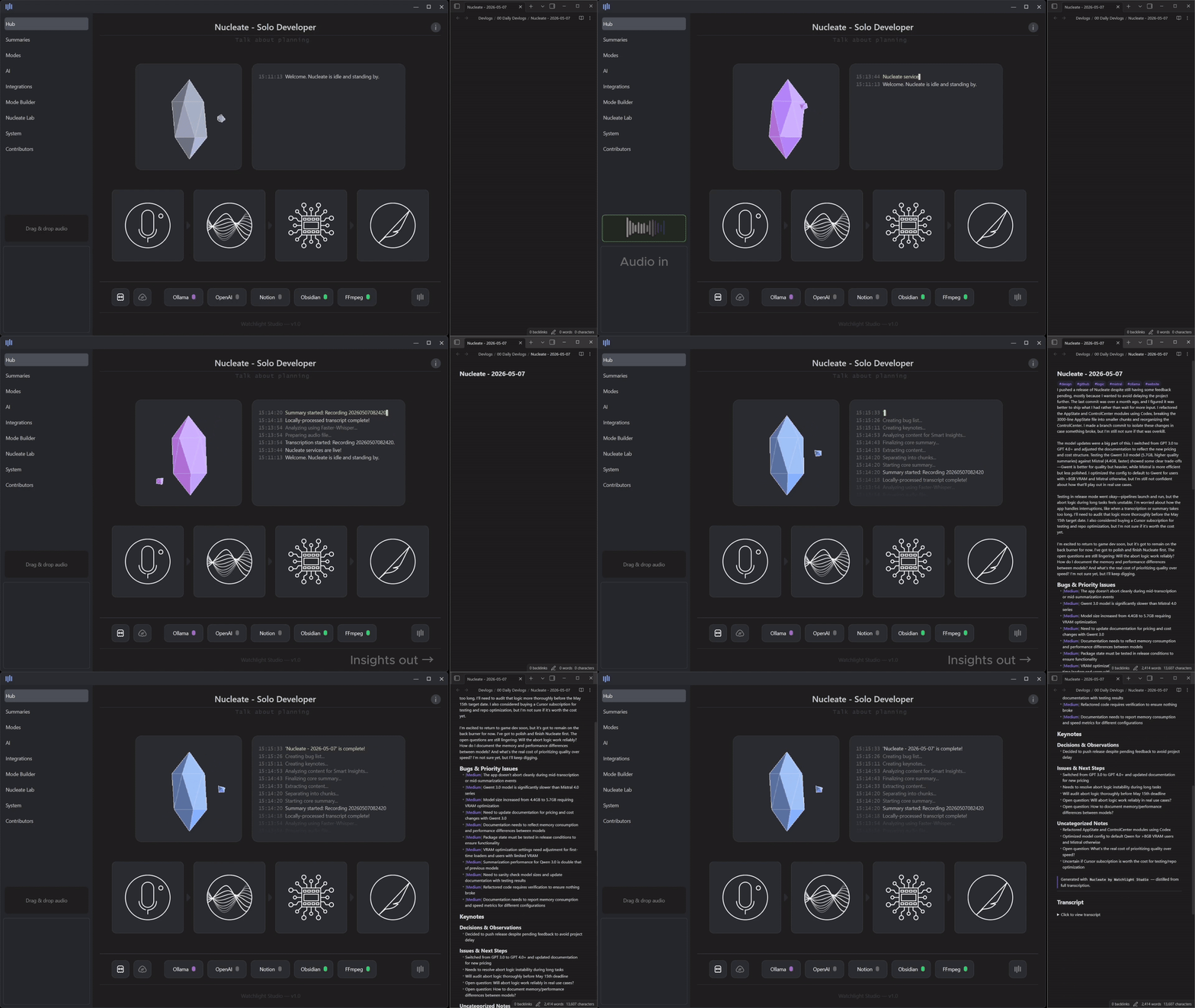
v1.0 In-app capture of Summaries and Insights produced automatically from audio.
Windows & macOS (Apple Silicon). Ad-free donationware — Pro license is free; donations optional.
Who is it for?
By design, Nucleate is an audio-first, automation tool. Its job is to be an engine that extracts content and pushes it to an endpoint note taking app like Notion or Obsidian. It’s quite powerful for users who are willing to record regular audio content but is not a good fit if you’re looking for a replacement note taking app or a chatbot.
I will be the first to admit that Nucleate is not perfect. It’s not coming from a AAA-studio, but rather from a solo-developer who wanted to learn something new and share it with the world. I’ve done my best and hope that it differentiates in ways that exceeds its imperfections. Check compatibility → · What makes it different →
Audio-first requirements
Nucleate doesn’t replace a typing-first workflow. Audio is the input. If you won’t record or drop audio files, this isn’t the right tool.
There are three ways to add audio into Nucleate:
- Record in-app — saves to Incoming Audio when you’re done.
- Manually drop files — copy recordings into the watched Incoming Audio folder.
- Sync from elsewhere — phone voice memos or cloud sync into that folder (see setup).
I personally have Nucleate setup to watch an Obsidian folder. When I record new audio, it gets pushed to Obsidian, detected and processed by Nucleate, and the result is pushed back to my Vault (see Cloud setup).
Nucleate processes once new audio is detected, not real-time. You won’t see a live caption stream, only the final post-processing output. A 10–20 minute recording works well for daily notes.
Flexibility and customization
I like to make stuff and code, but maybe you’ve got different interests. I wanted Nucleate to be as flexible as possible, so I pre-loaded 20+ user modes and 50+ Insights. Mix and match to find a specific setup that works for you. If none of the pre-loads work, make your own! I did not want a ‘one-size-fits-all’ kind of tool, so I enabled custom mode building and community sharing.
Nucleate Labs (Pro) is a space for one-off ASR processing outside of your main project history. It uses the same backend services but doesn’t plumb the output into long-term tracking. Useful when running something out of phase with your normal workflow.
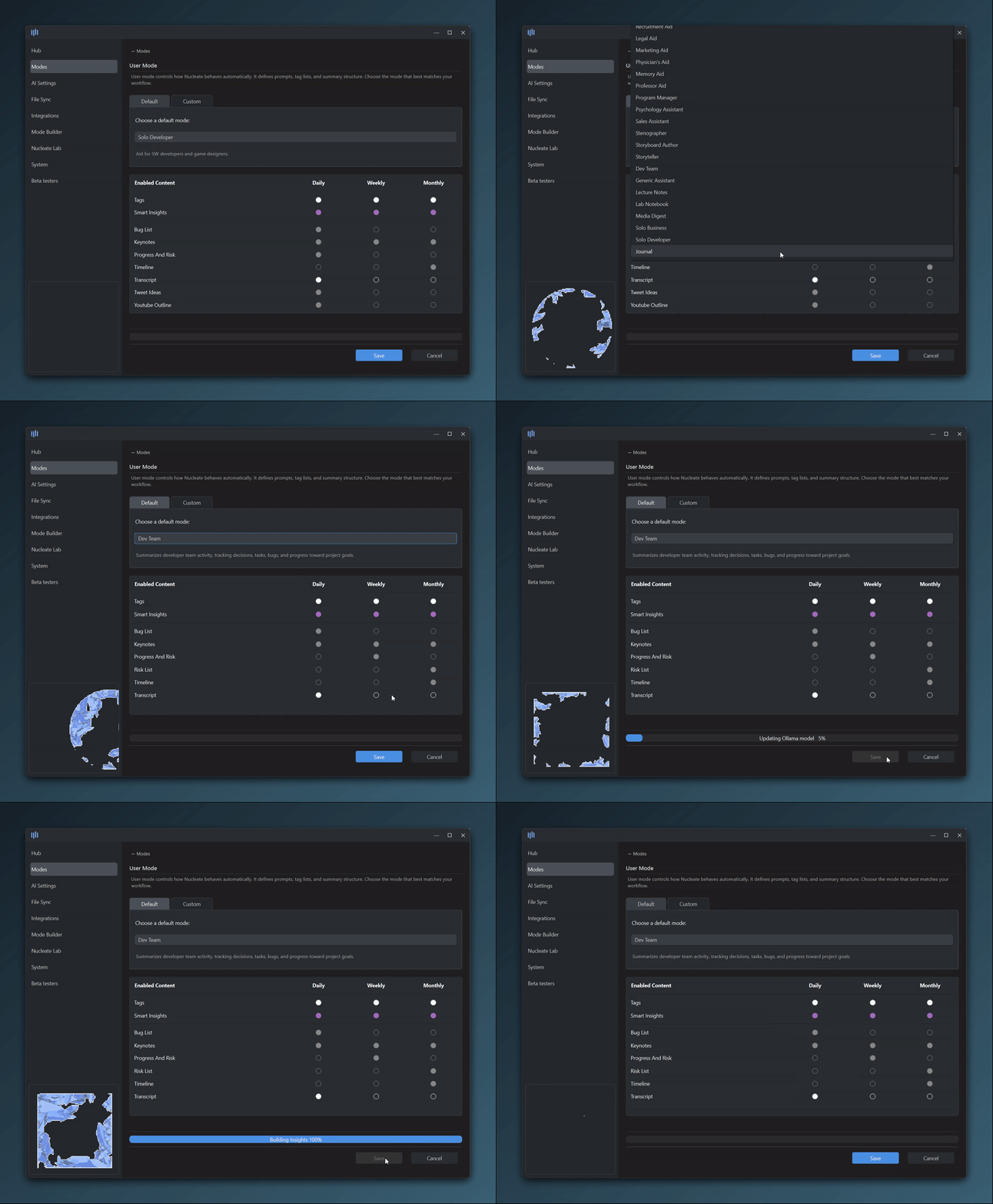
Prebuilt modes for developers, students, PMs, and more — or build your own.
Free and Pro
Nucleate is donationware. Automatic transcription, summarization, user modes, Insights, rollups, and local processing are all included. Pro unlocks unlimited weekly processing and Nucleate Labs, and the license is free to download. No ads, no subscriptions.
I know that there are a lot of other ASR apps out there that use a SaaS model. In my opinion, ASR is largely a solved problem. I don’t want to charge for standing on the shoulders of giants and would rather celebrate what makes Nucleate unique - project history, privacy, and data ownership. If you share the same values and want to support, please consider donating.
Without a license file, Nucleate runs as Free (weekly cap). That is what you get if someone shares only the app binary. Download Nucleate from Gumroad or Itch to get the Pro license — activate it in-app to unlock Pro.
Pro removes the weekly cap on new content and unlocks Nucleate Labs for manual processing. No required price, no ads, no subscriptions, no usage tokens. Gumroad or Itch may prompt you to donate — that choice is yours. Compare cost vs. Otter, Descript, Notion AI, MacWhisper, and DIY — or see the full feature breakdown in Technical details below.
License holders get all future versions and patches at no additional cost.
v1.3.0 · built solo · direct support from the developer
Explore
Ready to try it? Gumroad · Itch.io
Technical details
Feature comparison
Free gets nearly everything; Pro removes the weekly cap and unlocks Labs. Chart below has the full breakdown.
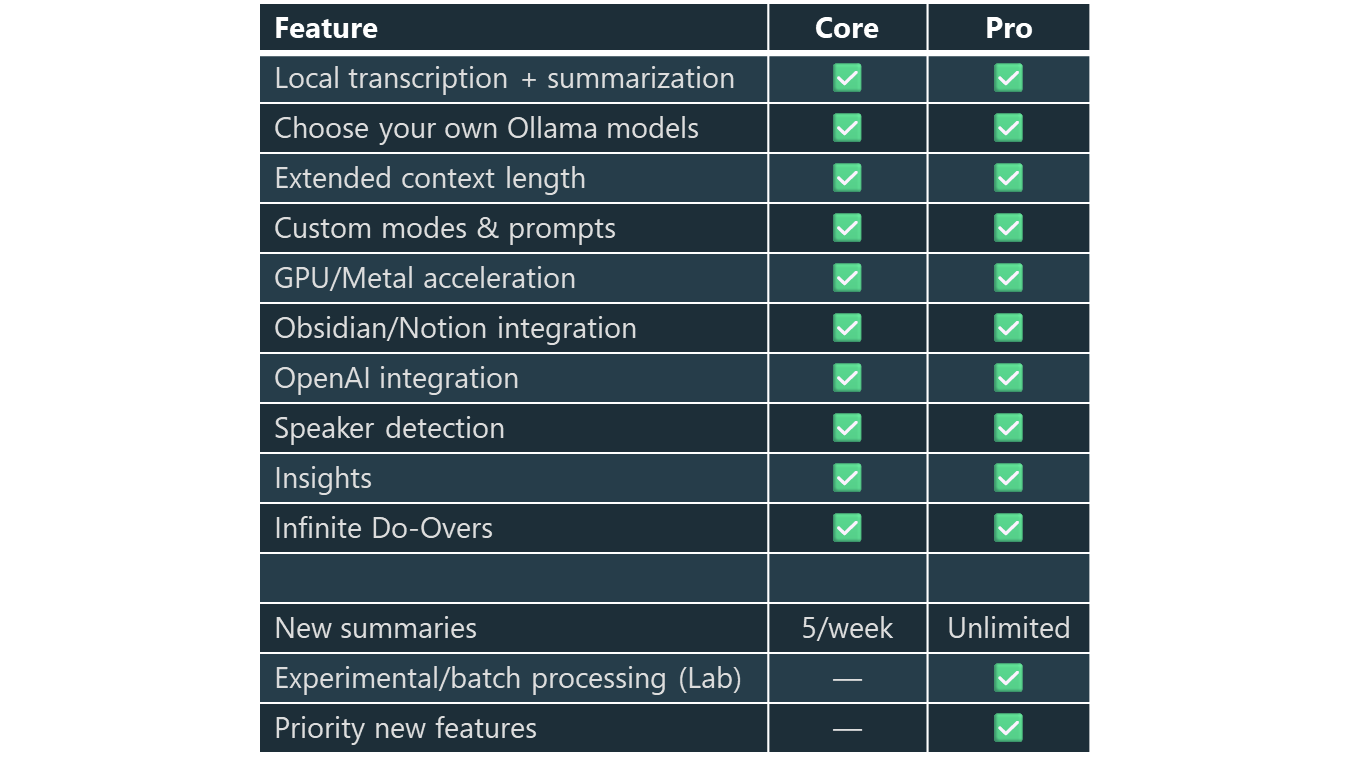
Compatibility
Compatibility
Nucleate works on Windows and macOS (Apple Silicon), but not Linux. Local GPU/Metal acceleration when your hardware supports it. 16GB RAM (or Unified Memory) recommended.
NVIDIA GPU with ≥8GB VRAM is fully supported, though more is better. AMD GPU hardware is not natively supported and will fall back to CPU-only local processing.
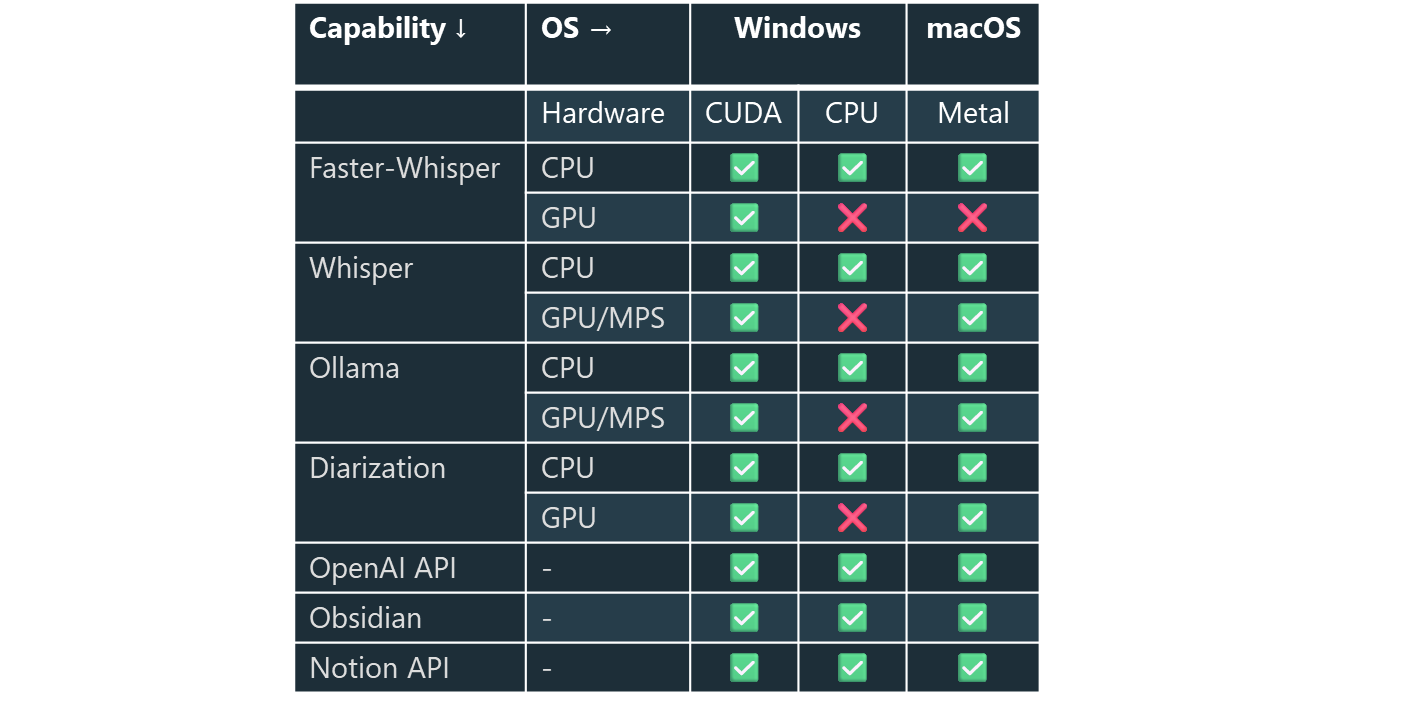
Performance
Local ASR keeps intake private and cheap. Summarization, Insights, and rollups compound over time. Built-in benchmarks let you gauge transcription, summarization, and diarization speeds on your hardware. On most modern hardware, local processing typically costs far less than cloud.
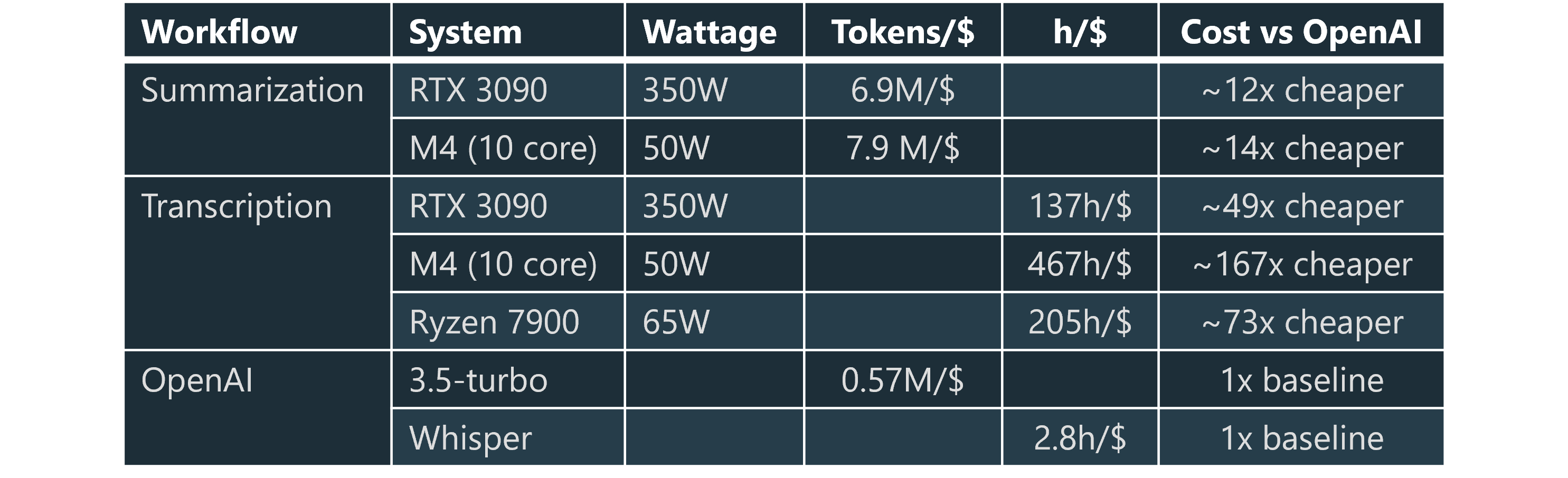
Why “Nucleate”? Nucleation is what happens when atoms align into a structured arrangement. Crystals form this way in chemistry and often grow from saturated solutions.
When we talk out loud, free flowing thought is messy and saturated with data. Nucleate helps concentrate and crystallize insights out of raw source material.